When it comes to electronic gadgets, I’m a bit of a geek. If it has a circuit board inside and a low enough value outside, you can be sure I’ll be taking it home with me. So a few years ago, when I saw external USB hard drives on the shelf of a national discount chain for just $10, I couldn’t resist picking one up. What I didn’t realize at the time, was that I would get a lot more from the sale than more storage space.
It’s a story I hadn’t thought about in a long time – it came to mind recently after learning that the rising cost of computer parts has pushed more users into the second-hand market than ever before. That makes the lessons from these experiences, for both buyer and seller, especially relevant.
What’s in the Box?
It wasn’t like that just The low price that attracted me to these hard drives, was also the stated capacity. They were listed as 80 GB, which is an unusually low number to see on a box in 2026. Apparently nobody makes 80 GB drives these days, so given the price, my first thought was that it would contain a jerry-rigged USB flash drive. But if that were the case, you would expect the power to be a certain power of two.
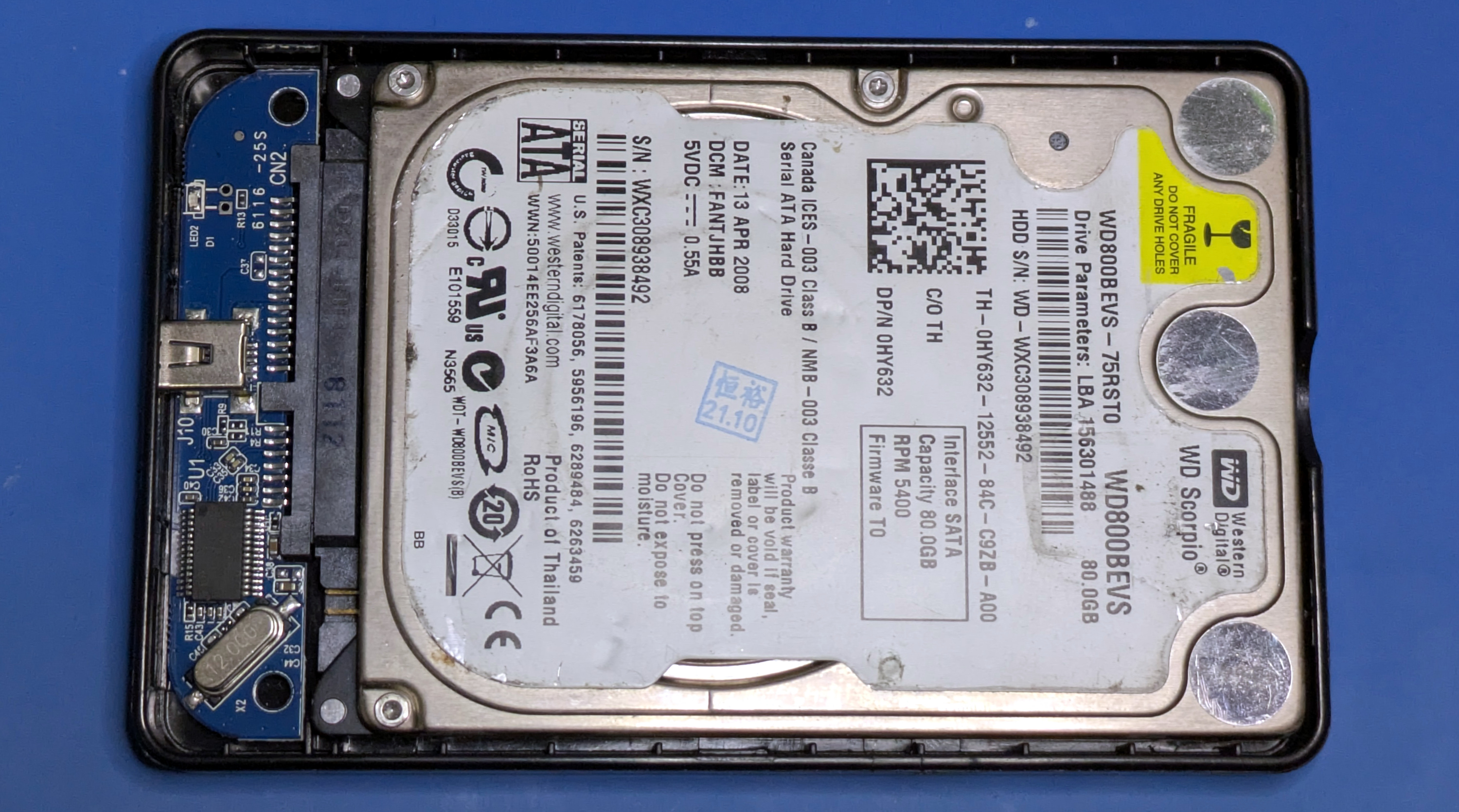
When I opened the case, what I found inside was somewhat surprising and incredibly obvious. The last thing I expected to see was an actual spinning hard drive, but that’s because I had no idea who put this product together. I was thinking about newly manufactured, modern hardware. Instead, the drive was about 20 years old, and must have been available for pennies on the dollar since they were probably gathering dust in a warehouse somewhere.
Or at least, that’s what I thought. After all, surely no one would have the guts to take a bunch of old used hard drives and package them up as brand new… right?
Verified Previous Owner
When I saw that the drive inside the enclosure was older than both of my children, I was curious about its history. Especially given the scuff marks and dirt on the drive itself. An old stock drive from 2008 is one thing, but if this drive has time on the clock, that’s a whole different story. Forget the implications of selling used merchandise as new – if the drive has seen significant use, even $10 is a steep price.
Fortunately, we can easily access this information through Smart Monitoring, Analysis, and Reporting Technology (SMART). Using the smartctl tool, we can get a reading of all the SMART parameters of the drive and find out what we are dealing with:
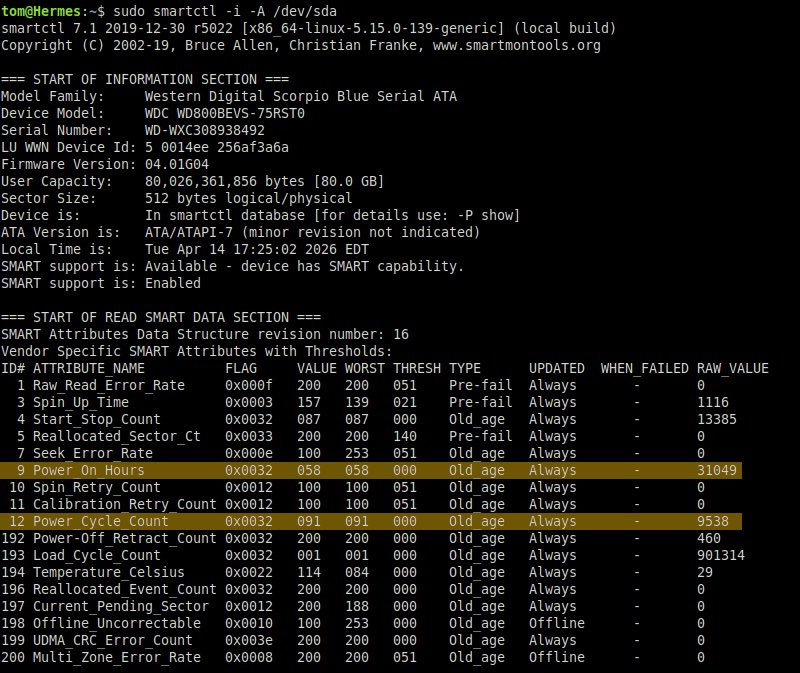
Well, now we know why these things are so cheap. According to SMART data, this particular drive went through 9,538 power cycles and accumulated 31,049 hours of total powered time. I’ll do the math for you, that’s a little over 3.5 years.
Note that all attributes are either or Old_age or Pre-fail. The word “used” is an understatement, this drive has been driven to hell.
Buried Treasure
It’s a fair bet that anyone who finds themselves regularly reading Hackaday has an inquisitive mind. So in his time, I’m willing to bet you’re wondering the same thing I did: if this drive has been used for years, does it still contain files from its previous life?
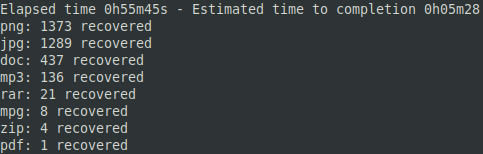
I was willing to bet that the drive had gone through nothing but the usual quick format, and that even a simple attempt to recover the file would return interesting results. As it turns out, “Simplistic Attempt” is my middle name, so I fired up PhotoRec and pointed it at our bargain drive.
It only took a few minutes before the file counters started jumping, proving that no attempt was made to properly clean the drive before repacking it. So not only is this drive old and used, but it still contains information from wherever it was all those years ago. If it comes from a personal computer, the information can be private in nature. If it was a business machine, the files may contain sensitive proprietary data.
In this case, it seems a little bit of both. I didn’t spend much time examining the recovered files, but I figured I examined them enough to know that someone in China probably wouldn’t be too happy to know that their old hard drive ended up on the shelf of an American discount store.
First we have hundreds of personal photos, from vacation photos to formal portraits.

Photos are fun in the sun, but DOC and PDF files are business. I will not reveal the name of the company this person works for, but I have received business proposals for various civil engineering projects within the Minanghang District of Shanghai worth millions of dollars.
Once is Happenstance….
I know you are wondering, dear reader. If the first drive I pulled off the shelf had loads of personal and professional information on it, how likely is it that it won’t happen again? Maybe it was a fluke, and some drives will be empty.
That’s a great question, and of course we can’t make a decision on just one data point. That’s why I went back the next day and bought three more drives.
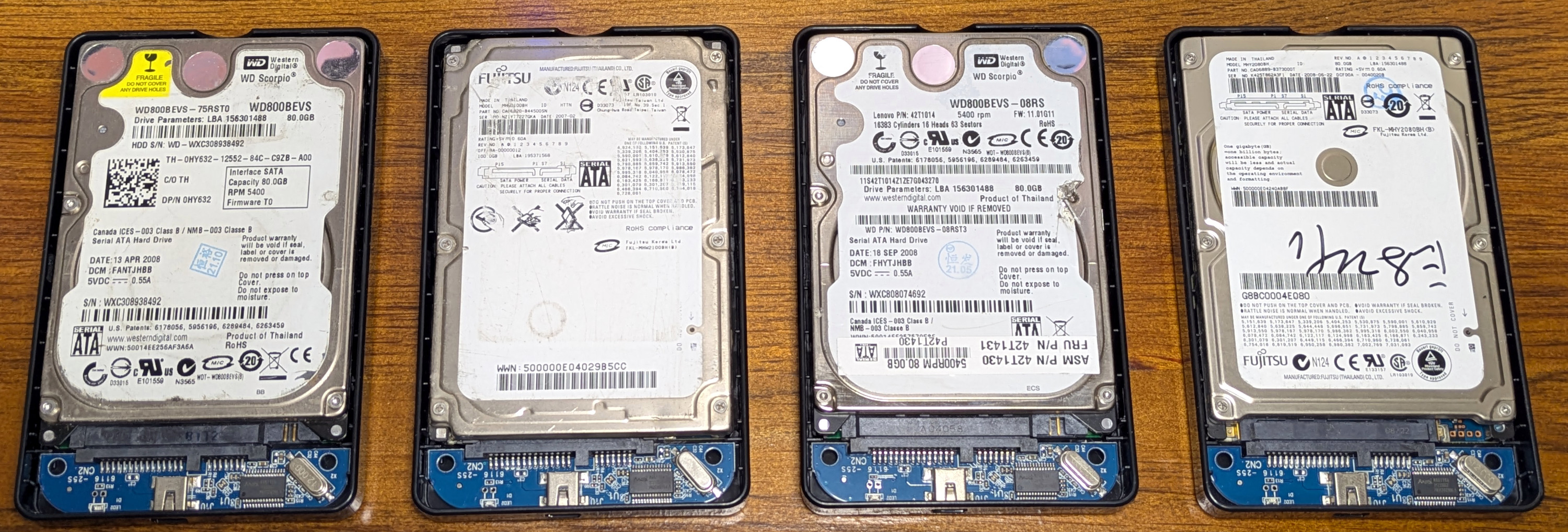
Right off the bat, it’s important to note that no two drives are the same. Two are Western Digital and two are Fujitsu, but neither of them have the same model number. The sharp-eyed reader will also notice that one of the drives is 100 GB, but is partitioned to 80 GB to match the others.
Three drives were produced in 2008, and one from 2007. I won’t go through the SMART data for each, but suffice it to say that each drive has a few thousand hours on the clock. Although for what it’s worth, the first drive is the lifetime leader so far.
The fourth drive was different. It contains more than 32 GBs of Hollywood movies, the most recent of which were released in 2010. I think this drive came out of someone’s media center. Now I haven’t been on the beach, as it were, since my teenage years, but even if I wanted to add these titles to the list of films I didn’t find the right way, it wasn’t the first thing. Given the time they were downloaded, most of them were below DVD resolution.
Moreover, they were all called in Chinese. Definitely not my idea of a movie night.
A cautionary tale
Granted, given that they were sold at a home electronics store, the chances of these drives being purchased by someone with the intention of extracting any meaningful data from them are slim to none. But as you read this, you know that the chances are not zero. I had no bad intentions, but the same cannot be said for others.
So what can we take from this? First, if you plan to sell or give away any of your old drives, make sure they are properly wiped. In the dusty past, the recommendation would have been to use Darik’s Boot and Nuke (DBAN) live CD for Linux, but the project was discovered in 2012 and development stopped a few years later. Fortunately, the GPLv2 tool DBAN that ran against the drive was forked and is now available as a wipe.
But as mentioned before, I get the impression that these drivers were from businesses dumping their old machines. If that’s the case, users can’t really be blamed, as they wouldn’t be able to wipe the drives even if they knew in advance that their work computers had been tampered with. But they would certainly make an effort to keep their personal data off company property. It’s one thing to have some trade secrets stolen, but you don’t want pictures of your kids in the mix.
In short, no one cares what happens to your personal data more than you, so make sure it doesn’t get away from you. Otherwise another hunting thrower might be going through it in a few years.