Microsoft has introduced new protections for Windows to protect against phishing attacks that abuse Remote Desktop connection (.rdp) files, add warnings and automatically disable dangerous shared resources.
RDP files are often used in business environments to connect to remote systems because administrators can configure them in advance to redirect local services to a remote host.
Threat actors are increasingly abusing this functionality in phishing campaigns. The Russian state-sponsored group APT29 has previously used malicious RDP files to steal victims’ data and credentials.

If opened, these files can connect to attacker-controlled systems and redirect local drives to the connected device, allowing the attacker-controlled device to steal files and credentials stored on the disk.
They can also capture clipboard data, such as passwords or sensitive text, or redirect authentication methods such as smart cards or Windows Hello to impersonate users.
New RDP security is being released
As part of the April 2026 cumulative updates for Windows 10 (KB5082200) and Windows 11 (KB5083769 and KB5082052), Microsoft has now released new protections to prevent malicious RDP connection files from being used on devices.
“Malicious actors abuse this capability by sending RDP files via phishing emails,” Microsoft warns.
“When a victim opens a file, their device silently connects to a server controlled by the attacker and shares local resources, giving the attacker access to files, credentials, and more.”
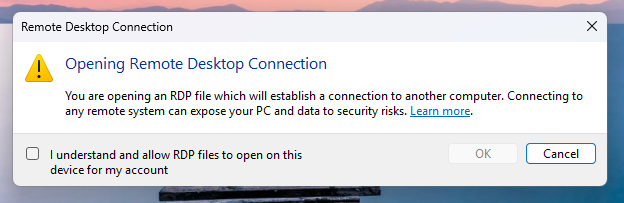
After you install this update, when users open an RDP file for the first time, a one-time educational prompt is displayed that explains what RDP files are and warns of their dangers. Windows users will then be prompted to acknowledge their understanding of the vulnerability and press OK, which will prevent the warning from being displayed again.
Source: Microsoft
Future attempts to open RDP files will now display a security dialog before any connection is made.
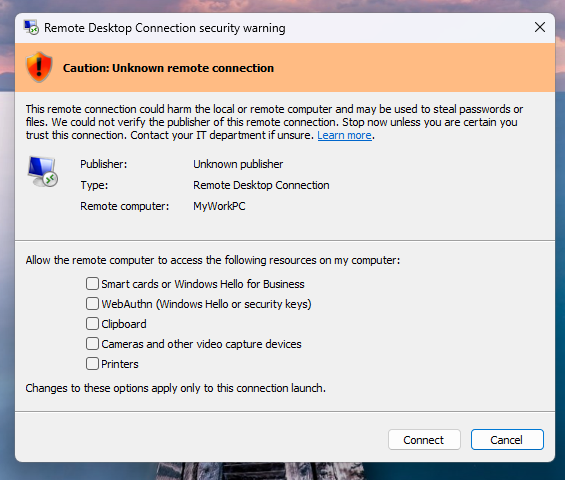
This dialog shows if the RDP file is signed by a verified publisher, the remote system address, and lists all local resource redirects, such as drives, clipboards, or devices, so every option is disabled by default.
If the file is not digitally signed, Windows displays the warning “Warning: Unknown remote connection” and labels the publisher as unknown, indicating that there is no way to verify who created the file.
Source: Microsoft
If the RDP file is digitally signed, Windows will display the publisher, but still warn you to verify its validity before connecting.
It should be noted that this new protection only applies to connections initiated by opening RDP files, not those made through the Windows Remote Desktop client.
Microsoft says that Administrators can temporarily disable these protections by going to HKLMSoftwarePoliciesMicrosoftWindows NTTerminal ServicesClient The key to register and modify the file RedirectionWarningDialogVersion value is therefore set to 1.
However, since RDP files have historically been vulnerable to attacks, it is highly recommended to keep this protection enabled.

Automatic logging proves that the path exists. BAS proves that your controls are stopping you. Many teams run without each other.
This white paper outlines six areas of validation, indicates where coverage ends, and provides clinicians with three diagnostic questions for any screening tool.